
In this case study Dr Sebastian Krook describes a range of tools he uses in his blended units to aid student engagement and create a sense of community.
In this case study Dr Sebastian Krook describes a range of tools he uses in his blended units to aid student engagement and create a sense of community.
School:
Unit:
Mode:
Context:
Academic:
Student profile:
Students enrolled:
Peter Faber Business School
BUSN110 Responsible reasoning and communication
Attendance
Bachelor of commerce/Bachelor of business administration, 1st year
Dr Sebastian Krook
First year, undergraduate
25
Hear about Sebastian’s experience…
ACU Case study: Student focused online presence in business - BUSN110 Responsible reasoning and communication - S.Krook (2016)
Many thanks to the Faculty of Law and Business for the use of their Pop-up Studio equipment to record this interview.
Length: 9 mins.
This introductory unit has been designed, explicitly, to develop students reasoning, critical thinking, and communication skills.
The LEO template was designed to have a consistent naming of sections and heading hierarchies. This will aid ease of navigation and reduce cognitive load. Sebastian particularly focused on providing the unit essentials, rather than providing too many options. The aim is to make things easy and seamless for the students.
|
Format |
Time |
Type |
| Asyncronous online material | Short overview videos, readings, individual and collaborative activities | |
|
Face to face lecture |
1 hour per week |
Lecture that integrates polling technology using student’s smart phones/laptops and LEO choice and quiz functions. |
|
Face to face tutorial |
1 hour per week |
|
Assessment task |
Length |
Weighting (%) |
Description |
|
Essay (individual) |
1500-2000 words |
30% |
In this essay students review the development of the online video as a new means of organisational communication, and provide a reasoned position on how the online video will develop, be used, and change within the next ten years. |
|
Presentation outline and materials (groups of 4-5 students) |
20 mins |
20% |
The presentation document includes: (a) The slides or presentation materials with notes (b) A complete list of references as the final slide (c) An outline of group contributions detailing the responsibilities of each group member, and signed by all group members. |
|
Exam |
2 hours + 10 mins |
50% |
The exam is completed via an online test. 27 questions in the exam (multiple choice (20) + short-answer (6) + essay question(1)) |
The above assessments may have been designed before the latest update to the ACU Assessment Policy. See Assessment Policy for up-to-date advice on designing your assessments.
Scroll through these examples to see some highlights from the unit.
This is a list of some of the major tools used in this unit.
| Tool |
Rationale |
Resources |
|
Echo360 |
Recording face-to-face lectures and making available to students on LEO afterwards. |
See the LEO ECHO360 guide See the eLearning 101 webinar, Embedding Kaltura and YouTube videos in your units |
| Adobe Presenter, iMovie, Adobe Voice on iPad |
Adobe Presenter was used for short screen recordings. Sebastian edited them in iMovie on an iPad, and sometimes added in a film clip that was recorded on his iPad as well. He used Adobe Voice for short “lecture overviews”, it’s a really handy tool that works on an iPad, and is ideal for short recordings. |
|
| Glossary |
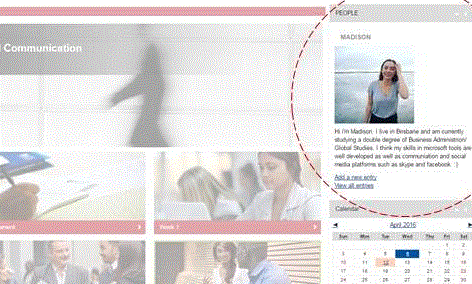
Every time a student logged in there was a picture and bio of a fellow classmate (different each time) - a 'people gallery'. This helped create a sense of community and break down the sense of online isolation. Sebastian achieved this through using the LEO glossary and block features. He instructed students to upload a photo and a bio into a glossary on LEO. Once the glossary was created, he created a LEO block ('random glossary entry' type), set it to draw from the bio glossary and located it at the top right-hand side of his LEO unit.
|
See LEO blocks (see under Resources) |
|
Choice |
Sebastian used the LEO Choice tool to record attendance in lectures. Students used their laptops/smart phones, and this avoided having to send around a paper sheet for attendance. He also used the tool to conduct polls in the lecture. Students can see their result and classes’ summarised result.This is formative feedback for the student, and the teacher able to see what areas the students may need for cover in greater detail and provide further support. |
See LEO choice guide |
| Turnitin voice comments | Time is saved in marking by using the Turnitin voice comments. |
Here is a short video about how to leave a voice comment on a student's paper in GradeMark, Turnitin: Voice Comments in GradeMark(Lee 2012). Read about one academic’s experience using Turnitin voice comments, Using audio feedback in Turnitin – one academic’s experience(Catherine 2014) |
| Quiz | Five multiple choice questions at the end of each lecture with feedback. | See the eLearning101 webinars, Quizzes in LEO part 1 and 2 See LEO Quiz guide |
| Padlet | Sebastian used this virtual whiteboard for facilitating students in the allocation of themselves into groups for assignments. He embedded the unique Padlet URL within a LEO ‘label’ feature. | Here is an informal introduction to Padlet, Collecting Student Ideas Using Padlet (Paperless classroom 2013) |
| Camera | Students worked on Marketing Plans on butchers paper in a tutorial. Photos were taken of the plans and turned into a collage on unit page. This personalised the unit and showcased the student’s work.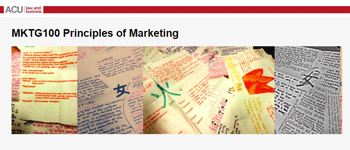 |
These are examples of the kinds of support the academic staff building this unit drew on.
Sebastian would like to focus on the following for future iterations of the unit:
Please contact the Learning and Teaching Centre for professional development, resources and advice for your learning and teaching needs at ACU.
Canvas provides a free, 24/7 live chat and support number for all technical queries

 Facebook
 Twitter
 LinkedIn
 Copy Link